Pixel art templates
Twenty nine ready drawn sprites on a counted grid, in five groups: adventure gear, places and scenery, small icons drawn to a 16 by 16 canvas, tiles that repeat seamlessly, and the night sky.
29 free patterns ·
Drawn and checked by  Ivy Skein
What can I do with a pixel art template?
Colour it in on paper, copy it square for square into a pixel editor, work it in fuse beads on a pegboard, or stitch it on aida. The chart is the same object in all four cases: one square, one colour, with a key naming every colour used.
Adventure gear
Seven pieces of kit out of the same imagined quest: a sword, a shield, a potion, a chest, a crown, a key and a loose gemstone. They share one dark keyline and one light source, so any two of them sit on a sheet together without one looking borrowed from somewhere else.


Places and scenery
Seven places rather than objects, and the group where the grids run widest: a castle at 28 squares across, a mountain, a tent, a campfire, a lighthouse, a windmill and a balloon. Each one is built so the silhouette alone tells you what it is, which is the job a sprite has to do at small size.


Small icons on a 16 by 16 canvas
Six designs drawn to a 16 by 16 canvas and four colours or fewer, which is the size and the budget most pixel work is actually done to. A bulb, a battery, a padlock, an hourglass, the pointer arrow and a chequered flag, every one filling its canvas edge to edge instead of floating in the middle of a bigger grid.


Seamless tiles that repeat
Five designs that REPEAT. The right hand column of each one runs on into its own left hand column and the bottom row into the top, so a brick wall, a plank floor, a cobbled street, a sea or a field of any size is this one small chart printed over and over. Print four copies and butt them together to see it.


Night sky and space
Four night sky subjects, and the group where the house outline rule bends. A planet, a satellite, a helmet and a saucer are all lit hard from one side against black, so these carry a shine or a shadow where everything else on the page carries a dark keyline the whole way round.


How to read one of these charts
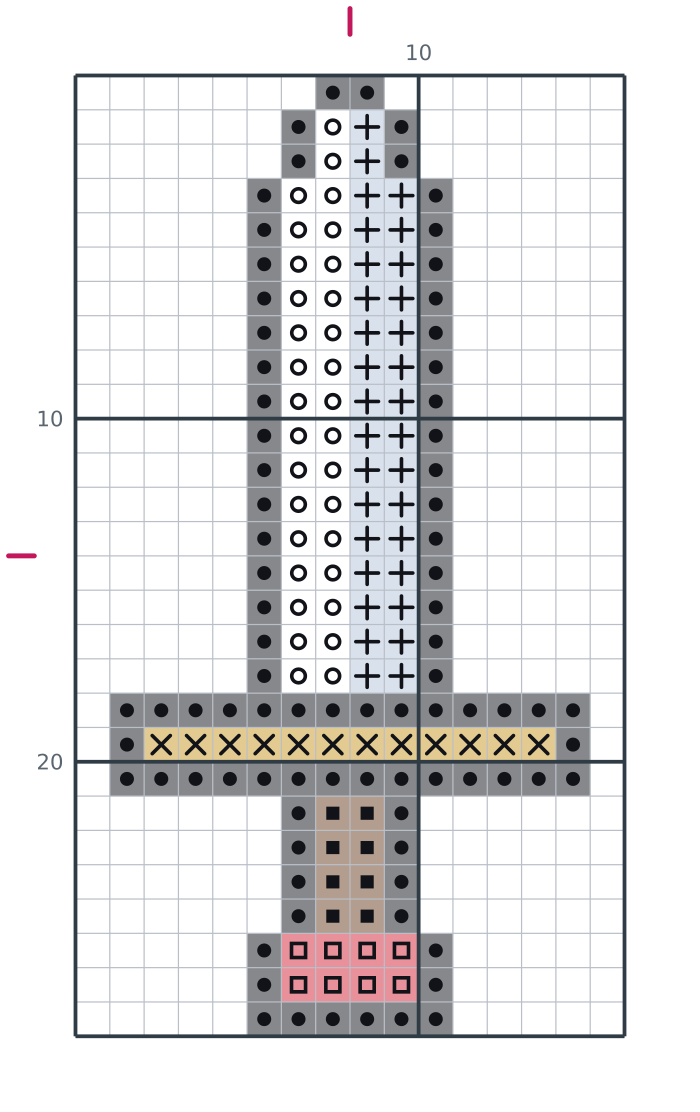
- One square is one full cross stitch, one bead or one pixel. The symbol in the square tells you which colour goes there.
- The heavy lines every ten squares are counting lines. Count in tens and a miscount shows up in the same row it happened.
- The small marks on the top and left edges mark the centre of the design, which is where most people start.
- The key under the chart lists every symbol with its colour, our thread code and how many squares of it the design uses.
One design, four ways to finish it
Each template on this page is a small counted design with its own symbol chart and colour key. Print it and colour the squares in, copy it into a pixel editor at the same size, lay it out in 5mm fuse beads, or stitch it on 14 count aida at the finished size printed on the card. Nothing changes between those four except what fills the square.
There are 29 templates here in five groups. Two of them are subjects, adventure gear and scenery, and they are the designs this page launched with. The other three are about the way the design is built: six icons pinned to a 16 by 16 canvas, five tiles that repeat seamlessly, and four space subjects lit from one side instead of outlined all round.
What a seamless tile is, and how to check one
A tile is a design whose edges agree with themselves. Lay a copy to the right of the original and the bricks carry on across the join; lay one underneath and the courses carry on down it. That is the whole trick, and it is what turns a 16 by 16 chart into a wall as big as you want without drawing anything else. The five here are a brick wall, planks, cobbles, water and grass, and the honest way to test one is to print four copies and butt them together on a table. If a line shows where they meet, the tile is not seamless, and none of these show one.
Working to a fixed canvas
The icon group is all 16 by 16, which sounds like a limitation and is really the point. When the canvas cannot grow, detail has to be argued for: the padlock gets a keyhole only because the shackle was reduced to two lines, and the cursor is two colours because a third would have cost it the outline that makes it readable. If you want to draw your own to the same constraint, the printable pixel art grids page has a blank 16 by 16 to print, along with 28 other shapes including the tall and wide canvases.
Drawing your own beside them
The perler bead patterns page has more designs in the same square format, sized for a standard pegboard, including a group cut to a round board and a group cut to a hexagon. To chart a picture you already have, use the Pattern Maker, which turns it into a counted chart with a symbol key in a few seconds.
Originals only
Every sprite here is drawn from scratch. There are no game characters, no franchise mascots and nothing traced from another artist's work, because a pixel pattern made from somebody else's picture is a derivative work of it. That rule is why the space group is a planet, a satellite, a helmet and a saucer rather than any ship you would recognise, and why there is no alphabet on this page: the letters live on the cross stitch alphabet page, drawn once, on the same grid. The license page explains what you may do with these designs, including selling the physical pieces you make.
How to use these pixel grids
- Print the grid or the template at 100 per cent. The guide lines every ten squares keep long rows countable.
- Fill the squares with pencil, pen or paint, or copy the grid straight into a pixel editor at the same size.
- A finished grid works as a cross stitch chart or a bead pattern without changing a square, so a sketch here becomes a project.